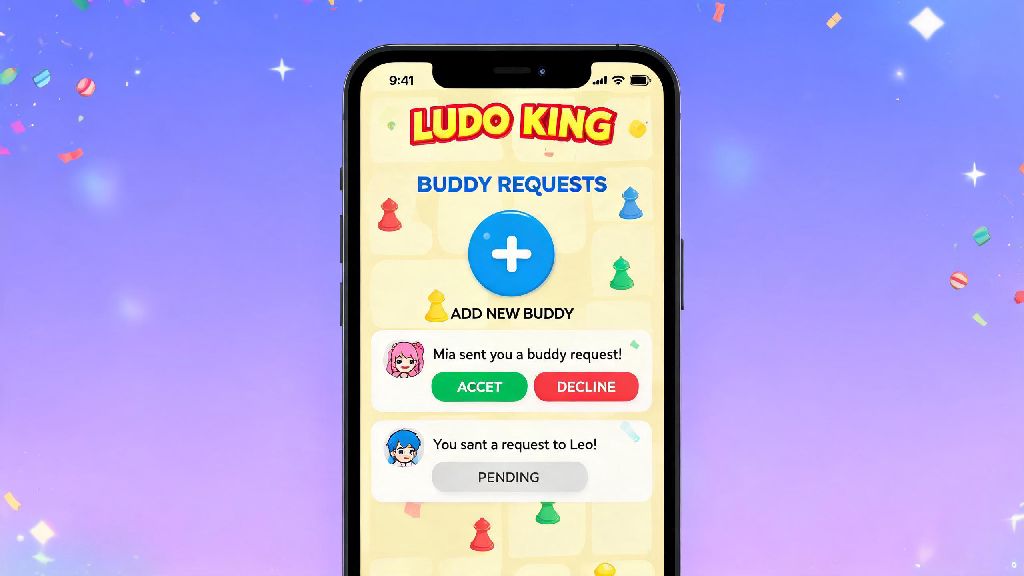
If you’ve ever opened Ludo King to play a quick match with friends instead of random opponents, you’ve probably noticed the buddy request feature pop up at some point. Many new players reach out asking what is buddy request in Ludo King, and how to use it properly to connect with people they enjoy playing with without running into unwanted interactions. It’s one of the most useful built-in social tools for the game, but it’s easy to misconfigure if you don’t know what each setting does. Even long-time players often miss small features that let them control who can send them requests and what information their buddies can see on their profile.
What is Buddy Request in Ludo King, and How Does It Work?
At its core, a buddy request is Ludo King’s version of a friend request, built directly into the game platform, no social media account linking required unless you choose to connect those accounts separately. When you play a match with a random player who plays fairly, doesn’t rage quit mid-game, or is just fun to compete against, you can send them a buddy request to connect directly for future matches. Unlike random matchmaking, adding someone as a buddy lets you invite them directly to private rooms, see when they’re online, and avoid getting matched with toxic players you’d rather skip.
You don’t have to share any personal contact information to send or accept a buddy request, all interactions stay within the Ludo King app by default. For example, if you regularly play Ludo King during your lunch break, building a list of buddies who are online at the same time as you means you can jump straight into a match without waiting for random players to join, which saves you a lot of time if you only have 15 or 20 minutes to play. The feature also lets you assign nicknames to your buddies, so you can keep track of who plays what style, whether they prefer team matches or free-for-all, and if they’re down for casual play or more competitive ranked matches. You might also see buddy requests pop up if you join a public Ludo King tournament, where players often add each other to form teams for future events.
Step-by-Step Guide to Using Buddy Requests in Ludo King
Using the buddy request feature is straightforward once you know where to find the relevant buttons, but a lot of new players miss the options hidden in profile menus and notification tabs. The process works the same across iOS, Android, and desktop versions of the game, so you don’t have to learn a new system if you switch devices. Below are the most common actions you’ll take with buddy requests:
If you want to send a buddy request to someone you know in real life, you can share your unique Ludo King player ID with them, so they can search for your profile directly instead of having to match with you randomly. That saves a lot of time if you’re trying to connect with friends who don’t live nearby. We recommend only sending buddy requests to players you’ve already played at least one full match with, so you know you enjoy their play style before adding them permanently to your list.
Best Practices for Safe and Positive Buddy Request Interactions
While the buddy request feature is designed to make your Ludo King experience more fun, it can also lead to unwanted interactions if you don’t set clear boundaries for who can contact you. A lot of casual mobile game players enjoy switching between different social multiplayer games between Ludo King matches, to mix up their gameplay without losing the social connection they’ve built with their gaming buddies. Many players who love turn-based social games also play casual card games with their friend groups between Ludo King rounds, and IND Rummy is a popular pick for quick, low-stakes matches that work just as well with your existing Ludo King buddy list. It’s easy to swap between games with the same group, so you don’t have to build a new friend list every time you want to try a different casual game.
That said, you should always set clear boundaries for cross-game interactions, just like you would on Ludo King. Never share your phone number, address, or social media handles with buddies you don’t know in real life, even if you’ve played multiple matches with them. Most toxic interactions on Ludo King come from players who feel entitled to personal information after a few friendly matches, so setting clear boundaries early is key. If you get a buddy request from a player who was toxic, cheated, or rage quit during your match, you can tap the “Block and Report” option instead of just declining to help the Ludo King moderation team keep the platform safe for everyone. You can also adjust your privacy settings to only allow buddy requests from players you’ve already played a match with, which cuts down on random spam requests from people you’ve never interacted with before.
Common Buddy Request Issues and How to Fix Them
Even if you know how to use the feature correctly, you might run into occasional glitches or unexpected behavior with buddy requests. Most of these issues are easy to fix with a quick settings adjustment, and you don’t have to contact support for most common problems.
One of the most common issues players report is not seeing the “Send Buddy Request” button on a player’s profile. That means the player has turned off buddy requests in their privacy settings, so you can’t send one to them. Don’t spam public chat asking them to turn it on, that’s considered harassment and can lead to your account getting a temporary ban. Some players report that they can’t send buddy requests to players they met in ranked matches. That’s usually because ranked mode has stricter privacy settings by default, to prevent players from harassing opponents who beat them in competitive matches. If you want to add someone you played against in ranked, you can send them a quick, polite chat message asking if they’re open to buddy requests before you try to send one, so you don’t waste your time if they have requests turned off.
You can also hide your online status from your buddy list if you want to play solo without getting invites for group matches. That setting is found in the privacy menu, and you can toggle it on or off whenever you want, no restrictions. If you’re getting too many unwanted buddy requests, you can turn off requests entirely, or limit them to only players who are connected to your linked social media accounts. If your buddy list is full, you can remove inactive players you haven’t played with in over 6 months to make space for new people. There’s no limit to how many buddies you can remove, and you won’t face any penalties for cleaning up your list regularly. If you notice a buddy request disappears from your notifications before you can respond, that’s normal – requests expire after 7 days if the other player doesn’t take action, so you can send another one after that if you want, but don’t send more than two total, as that counts as spam.
The buddy request feature is designed to make your Ludo King experience more fun and social, without forcing you to interact with people you don’t enjoy playing with. Now that you know what is buddy request in Ludo King, you can use it to build a list of friendly, reliable players to compete with, cut down on time spent in random matchmaking with toxic opponents, and get more out of every match you play. Take the time to adjust your privacy settings to match your comfort level, and don’t hesitate to decline or block requests from players who make you feel uncomfortable for any reason. There’s no obligation to accept any request, even if you had a fun match with the other player.